MImageMagixOnline
  • Home
  • All tools · 60 free, no sign-up

    View all tools

    Basic Tools21

    • Dominant Color FinderDetect the primary color and palette of any image.
    • Image to PDF ConverterConvert one or more images into a single PDF document.
    • PPT Images to PDFExtracts all images from a .pptx file and compiles them into a PDF.
    • Image ConverterConvert single images between JPG, PNG, WebP, BMP.
    • Image to Text Converter (OCR)Extract text from images using Optical Character Recognition.
    • PDF to Image ConverterConvert PDF pages to high-quality images (JPG/PNG).
    • ICO to PNG ConverterConvert ICO files to high-quality PNG images.
    • TIFF to JPG ConverterConvert TIFF image files to JPG format instantly.
    • RAW to JPG ConverterConvert RAW image files to high-quality JPG format online.
    • BMP to JPG ConverterConvert BMP image files to JPG format.
    • SVG ConverterConvert SVG files/code to JPG, PNG, WebP.
    • HEIC to JPG ConverterConvert HEIC/HEIF images (from iPhone) to JPG online.
    • Bulk Image ConverterConvert multiple images at once and download as ZIP.
    • Image CropperCrop images to custom sizes/ratios.
    • Image ResizerResize images by pixels or percentage.
    • Rotator / FlipperRotate and flip images.
    • Grayscale ConverterConvert images to grayscale.
    • Favicon GeneratorGenerate favicons in various sizes (PNG, ICO).
    • Square PadderMake images square by adding padding.
    • Color PickerPick colors from an image and get HEX, RGB, HSL values.
    • Pixelate Image ToolBlur and pixelate parts or entire images with ease.

    AI Powered2

    • AI Background RemoverRemove image backgrounds using AI.
    • AI Image ColorizerColorize black & white photos.

    Advanced31

    • Website Image Audit ToolComprehensive SEO and accessibility scanner for website images. Check for missing alt tags, large files, and more.
    • Image AnnotatorDraw, highlight, add arrows, and labels (e.g., for tutorials).
    • Sprite Sheet MakerCombine images into a single sprite sheet with JSON frame map.
    • GIF CreatorCombine multiple images into an animated GIF.
    • Passport Photo MakerCreate official passport, visa, and ID photos.
    • Before/After SliderCompare two images using an interactive slider.
    • Meme GeneratorCreate memes by adding text to images.
    • Avatar Maker / Circle CropCreate circular avatars or crops with borders.
    • Base64 Encoder/DecoderConvert images to/from Base64.
    • Image CompressorReduce file size with adjustable quality.
    • Sketch ConverterTurn photos into artistic sketches.
    • Image FiltersApply various artistic and corrective filters.
    • Image MergerCombine images vertically/horizontally.
    • Watermark ToolAdd text or image watermarks.
    • Face Blur ToolApply a face blur effect to images.
    • Instagram Grid Maker & Image SplitterSplit images into seamless grids for Instagram or web.
    • EXIF Metadata Viewer/RemoverView or strip image metadata.
    • Collage MakerCreate photo collages with various layouts.
    • Rounded Corner GeneratorApply rounded corners to images with custom radii.
    • Image Border GeneratorAdd various border styles to your images.
    • Image Difference FinderCompare two images and highlight differences.
    • Histogram VisualizerShow brightness/color distribution with a chart.
    • Image Hash GeneratorGenerate perceptual hashes (pHash, dHash, aHash) and image fingerprints to detect near-duplicates.
    • Color Blindness SimulatorPreview how images look for colorblind users.
    • Compress PDFReduce PDF size in your browser; keep text or fit under 100 KB, 200 KB and more.
    • Split PDFSplit a PDF by page ranges, extract pages or remove pages. Runs in your browser.
    • Unlock PDFRemove a PDF password you know, or print and copy restrictions. Runs in your browser.
    • Protect PDFAdd a password to a PDF with AES-256 encryption. Runs in your browser.
    • Add Page NumbersNumber PDF pages in six positions and five styles, such as Page 1 of 10.
    • Advanced PDF MergerMerge multiple PDF files into one organized, optimized document.
    • Advanced PDF EditorEdit text, images, and structure in PDF files with ease.

    Markdown Converters6

    • Markdown to PDF ConverterConvert Markdown & GFM files, READMEs, technical docs, and resumes into publication-ready PDFs.
    • Markdown to Word ConverterConvert Markdown & GFM files, READMEs, technical docs, and resumes into Microsoft Word (.docx, .doc) files.
    • Markdown to HTML ConverterInstantly convert Markdown to clean, semantic HTML online. Free, no signup, supports GFM syntax. Copy code or download HTML file directly.
    • Markdown to TXT ConverterInstantly convert Markdown & GFM files, READMEs, technical docs into clean, formatted plain text (.txt). 100% browser-based & private.
    • Markdown to EPUB ConverterInstantly convert Markdown & GFM files, READMEs, and manuscripts into clean EPUB3 eBooks (.epub). 100% browser-based & private.
    • Markdown to RTF ConverterInstantly convert Markdown & GFM files, READMEs, and technical docs into Rich Text Format (.rtf) documents. 100% browser-based & private.
  • About
  • Blog
  • Contact
twitter [#154]
  1. Home
  2. Tools
  3. Sprite Sheet Maker
MImageMagixOnline

Your all-in-one solution for effortless, fast, and free online image manipulation tools. Built for creators, by creators.

twitter [#154]github [#fff142]Cosmos

Top Tools

  • Image Converter
  • Image Resizer
  • Image Cropper
  • Background Remover
  • Passport Photo Maker

Site

  • Home
  • About Us
  • Blog
  • Contact

Extensions

  • Format Converter (Chrome)
  • Image Annotator (Chrome)

Legal

  • Terms of Service
  • Privacy Policy
  • Refund Policy
  • Write for Us

All Tools

60 tools
  • Dominant Color Finder
  • Image to PDF Converter
  • PPT Images to PDF
  • Image Converter
  • Image to Text Converter (OCR)
  • PDF to Image Converter
  • ICO to PNG Converter
  • TIFF to JPG Converter
  • Website Image Audit Tool
  • RAW to JPG Converter
  • BMP to JPG Converter
  • SVG Converter
  • HEIC to JPG Converter
  • Bulk Image Converter
  • Image Cropper
  • Image Resizer
  • Rotator / Flipper
  • Grayscale Converter
  • Favicon Generator
  • Square Padder
  • Color Picker
  • Pixelate Image Tool
  • AI Background Remover
  • AI Image Colorizer
  • Image Annotator
  • Sprite Sheet Maker
  • GIF Creator
  • Passport Photo Maker
  • Before/After Slider
  • Meme Generator
  • Avatar Maker / Circle Crop
  • Base64 Encoder/Decoder
  • Image Compressor
  • Sketch Converter
  • Image Filters
  • Image Merger
  • Watermark Tool
  • Face Blur Tool
  • Instagram Grid Maker & Image Splitter
  • EXIF Metadata Viewer/Remover
  • Collage Maker
  • Rounded Corner Generator
  • Image Border Generator
  • Image Difference Finder
  • Histogram Visualizer
  • Image Hash Generator
  • Color Blindness Simulator
  • Compress PDF
  • Split PDF
  • Unlock PDF
  • Protect PDF
  • Add Page Numbers
  • Advanced PDF Merger
  • Advanced PDF Editor
  • Markdown to PDF Converter
  • Markdown to Word Converter
  • Markdown to HTML Converter
  • Markdown to TXT Converter
  • Markdown to EPUB Converter
  • Markdown to RTF Converter

Popular Converters & Size Tools

  • PNG to JPG
  • JPG to PNG
  • WebP to JPG
  • JPG to WebP
  • PNG to WebP
  • Compress JPEG to 200KB
  • Compress Image to 100KB
  • Compress Image to 50KB
  • Compress Image to 20KB
  • Resize Image for Instagram
  • SSC Signature Resize
  • IBPS Photo & Signature
  • NEET Photo & Signature
  • Signature Resize to 20 KB
  • PAN Card Photo
  • Indian Visa Photo
  • Australian Passport Photo
  • Indian Passport Size Photo
  • Remove EXIF Data
  • GPS Photo Viewer
  • Camera Settings Viewer
  • Image Properties Checker
  • Metadata Extractor
  • WebP to PNG
  • HEIC to PNG
  • BMP to PNG
  • AVIF to JPG
  • TIFF to PNG
  • HEIC to PDF
  • CR2 to JPG
  • NEF to JPG
  • ARW to JPG
  • DNG to JPG
  • PDF to JPG
  • PDF to PNG
  • SVG to PNG
  • SVG to JPG
  • SVG to PDF
  • Image to Base64
  • Base64 to Image
  • PNG to ICO
  • Compress Image to 10KB
  • Compress Image to 30KB
  • Compress Image to 500KB
  • Compress Image to 1MB
  • Compress PDF to 100KB
  • Compress PDF to 200KB
  • Compress PDF to 500KB
  • Hindi OCR
  • Screenshot to Text
  • Add Watermark to PDF
  • Sign PDF
  • Add Text to PDF
  • Add Image to PDF
  • Rotate PDF
  • Extract PDF Pages
  • Remove Pages from PDF
  • Unlock Aadhaar PDF
  • Reorder PDF Pages
  • US Passport Photo (2x2)
  • UK Passport Photo
  • Schengen Visa Photo
  • YouTube Thumbnail Resizer
  • Facebook Cover Photo Resizer
  • Flip Image
  • Circle Crop Image
  • Combine Images Side by Side
  • LinkedIn Image Resizer
  • Twitter/X Image Resizer
  • Stack Images Vertically
  • Photo Grid Maker
  • Crop Image to Square
  • Instagram No Crop
  • Instagram Carousel Splitter
  • Annotate Screenshot
  • Blur License Plate
  • Redact Image

© 2026 ImageMagixOnline. All rights reserved.

Made with ℓσνє for creators everywhere

    Sprite Sheet Maker & Atlas Generator

    Sprite Atlas Creator

    Optimize game assets

    0
    Frames

    Builder Settings

    2px

    Frame Editor

    Dropzone BackgroundDropzone Background

    Drag & Drop Game Assets

    Upload individual sprites, sequences, or folders. We'll automatically pack them into an optimized sprite sheet atlas!

    Supports PNG • WebP • JPG

    Sprite Sheet Maker & Atlas Generator

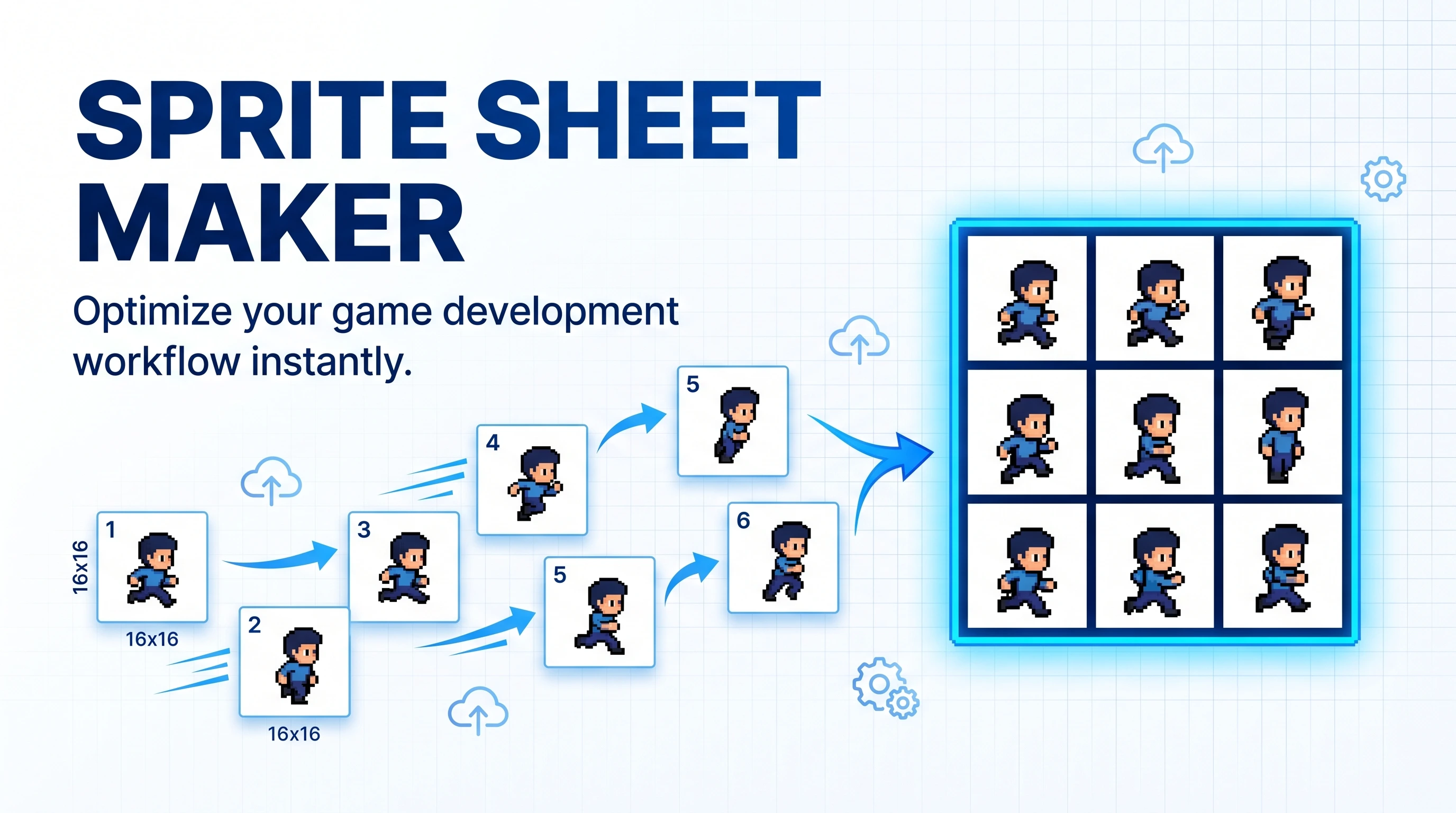
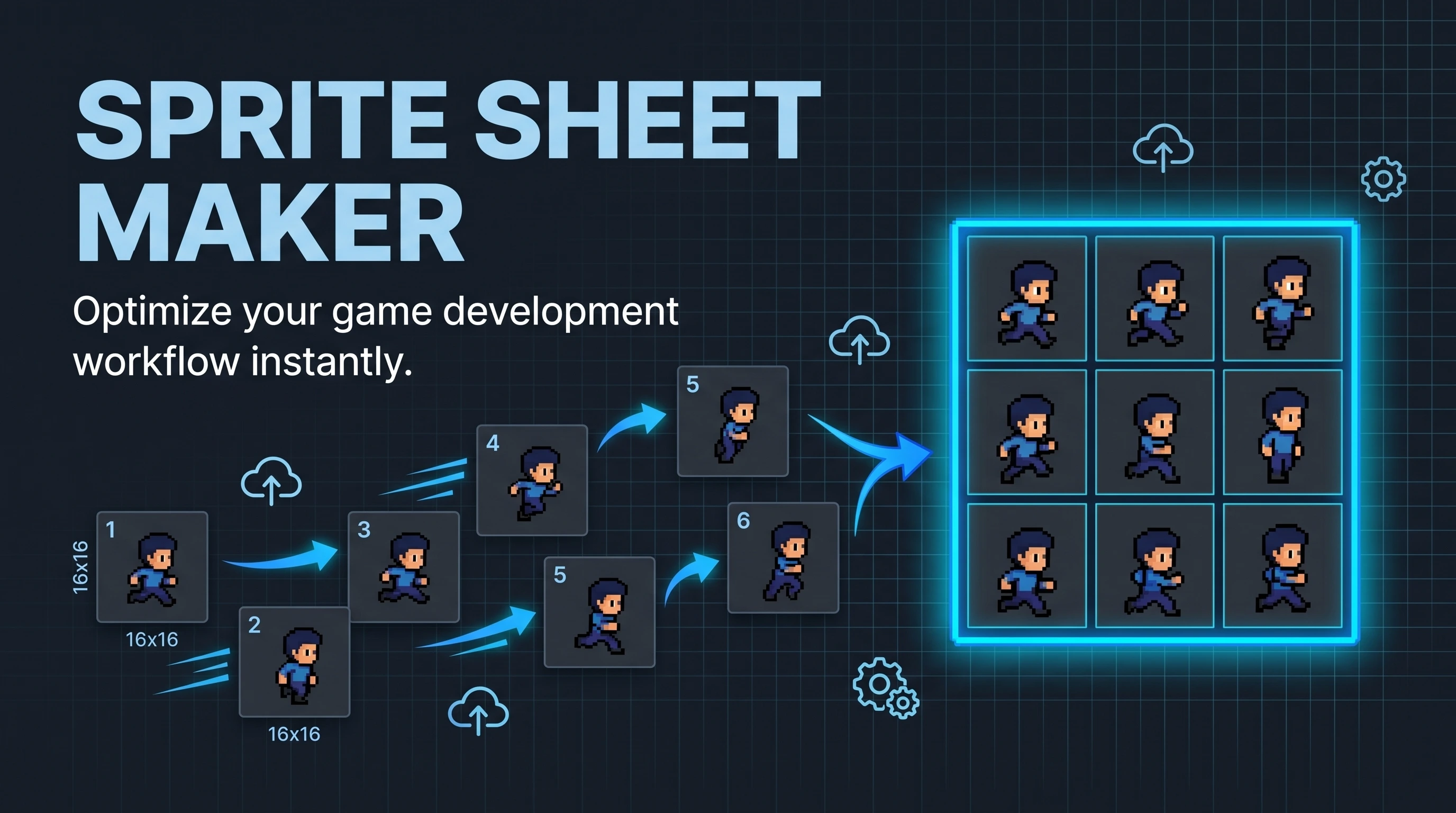
    Generate sprite sheets online instantly. Combine multiple images into optimized sprite atlases for games, animations, Unity, Godot and HTML5 projects.

    Sprite Sheet Maker PreviewSprite Sheet Maker Preview

    Why Use a Sprite Sheet Generator?

    A Sprite Sheet Generator is an essential game development asset tool. By packing individual animation frames and UI elements into a single, optimized sprite atlas, you drastically reduce draw calls, improve memory usage, and boost rendering performance in 2D games and web applications. Whether you are building an indie game in Unity, setting up pixel art for Godot, or creating CSS sprite animations for the web, our professional-grade online sprite sheet maker gives you total control over padding, power-of-two optimization, and smart packing algorithms—all processed instantly within your browser.
    Game Engine Ready: Export sprite metadata formatted natively for Unity, Godot, PixiJS, Phaser, and HTML5.
    Smart Packing Algorithms: Choose between basic grid layout or our advanced compact bin-packing to minimize wasted texture space.
    Power-of-Two Optimization: Force output dimensions to power-of-two (POT) sizes required by many WebGL and mobile game engines.
    Auto-Trim Transparency: Automatically trim empty transparent pixels around your sprites to drastically compress atlas file sizes.
    Real-time Preview Player: Test your animation sequences directly in the browser before exporting your final asset.
    100% Private & Secure: Processing happens entirely client-side. Your proprietary game assets are never uploaded to any server.

    How to Create an Atlas

    1

    Import Your Game AssetsDrag and drop your individual frames, UI elements, or character animations into the upload zone. You can import batches of PNGs or WebPs instantly.

    2

    Configure Packing SettingsSelect your packing mode (Grid or Smart Pack). Adjust padding, margin, and extrude settings to prevent texture bleeding. Enable Auto-Trim or Power-of-Two limits if your engine requires them.

    3

    Select Export PresetChoose the exact metadata format you need: standard JSON (Hash/Array), Godot XML/SpriteFrames, Unity data, CSS sprites, or custom generic outputs.

    4

    Generate Sprite AtlasClick 'Generate Atlas'. Our client-side engine will instantly calculate the most efficient packing layout and render your high-quality PNG/WebP texture.

    5

    Download Sheet & MetadataPreview your packed atlas and download both the optimized image and the corresponding coordinate mapping file, ready to drop straight into your game project.

    Advanced Sprite Sheet Concepts

    What Is a Sprite Sheet Maker?

    A Sprite Sheet Maker is a specialized software tool used primarily by game developers, pixel artists, and web designers to combine multiple smaller image files (sprites) into a single, larger image called a sprite sheet or sprite atlas. Instead of loading hundreds of separate PNG files—which requires significant computational overhead and memory—a game engine loads one large texture. The sprite sheet creator simultaneously generates a metadata file (usually JSON or XML) that maps the exact X and Y coordinates, width, and height of every individual frame within that large image. This allows the engine to 'slice' the sheet mathematically and render the correct animation frame instantly.

    How Sprite Sheets Work

    When you use an online sprite sheet generator, it takes your individual frames and places them onto a large canvas. Basic tools use a standard grid, while advanced tools (like our Sprite Atlas Creator) use bin packing algorithms to fit irregular shapes tightly together, much like a jigsaw puzzle. The tool records where each image was placed. When you import this atlas into a game engine like Unity or Godot, the engine reads the metadata file. When you instruct the game to draw 'Player_Run_Frame02', the engine looks up that name in the data, finds the coordinates on the giant texture, and only draws that specific rectangular slice to the screen.

    Why Game Developers Use Sprite Sheets

    In game development, rendering performance is dictated by 'draw calls'—the number of times the CPU tells the GPU to draw a texture. If a scene has 100 different UI elements and each is a separate image file, that requires 100 draw calls, which severely impacts frame rates. By using a game sprite sheet maker to pack all 100 elements into a single sprite atlas, the entire UI can be rendered in just one draw call. Additionally, sprite sheets reduce file storage overhead, optimize memory usage on mobile devices, and prevent 'texture bleeding' through precise padding controls.

    Sprite Sheets vs Individual Images

    While individual images are easier to manage in Photoshop, they are catastrophic for game performance. Individual images waste GPU memory because most graphic cards require textures to be loaded in 'Power-of-Two' sizes (e.g., 512x512, 1024x1024). A 100x100 image might take up 128x128 space in memory. When you use a sprite packing tool to combine them into a single 1024x1024 sheet, you eliminate this wasted memory. Furthermore, HTTP requests for individual images on HTML5 web games can bottleneck loading times; downloading one large sprite sheet is exponentially faster.

    What Is a Sprite Atlas?

    While the terms are often used interchangeably, a sprite sheet usually implies a uniform grid of animation frames (e.g., a character walking, where every frame is exactly 64x64 pixels). A sprite atlas implies a packed collection of images of varying sizes (e.g., UI buttons, varied character states, background props) tightly packed using an algorithm to save maximum space. Our platform functions as both a simple sprite sheet builder and a complex sprite atlas generator.

    Sprite Sheets for Unity & Godot

    Modern engines have built-in importers, but developers often prefer creating atlases externally for greater control, batch processing, or CI/CD pipelines. Using our tool to make a sprite sheet for Unity allows you to export precise JSON data or use our smart-pack algorithm to bypass Unity's internal packer. For open-source developers, you can easily make a sprite sheet for Godot by generating an XML format or a specific JSON mapping that integrates directly with Godot's SpriteFrames or AtlasTexture resources.

    Optimizing Sprite Sheets for Performance

    To achieve maximum performance with your animation sprite generator, enable our Auto-Trim feature. This removes invisible transparent pixels around your character frames before packing, shrinking the required atlas size dramatically. Remember to configure Padding (Spacing) to at least 2 pixels to prevent Edge Bleeding—a graphical glitch where neighboring sprites leak into each other due to GPU texture filtering. Finally, always toggle Force Power-of-Two for mobile game development to ensure hardware compatibility.

    Why Use ImageMagixOnline Sprite Sheet Maker

    Our platform is engineered as a professional Game Development Sprite Sheet Tool. Unlike generic image mergers, we provide developer-first features: client-side privacy (no uploads), smart bin packing, power-of-two constraints, and direct export presets for industry-standard engines. Whether you're a pixel artist needing a quick animation sheet, or a studio engineer optimizing an HTML5 game, our tool delivers premium capabilities completely free, with no registration required.

    Frequently Asked Questions

    Ready to Pack Your Sprites?

    Elevate your game development and animation pipeline with the ultimate Online Sprite Sheet Creator. From simple pixel art sequences to massive UI texture atlases, our tool provides the granular control and engine-ready exports you need to build high-performance experiences. Start packing your sprites securely and instantly today.

    Explore More Creative Tools

    GIF Creator

    Combine multiple images into an animated GIF.

    Instagram Grid Maker & Image Splitter

    Split images into seamless grids for Instagram or web.

    Image Hash Generator

    Generate perceptual hashes (pHash, dHash, aHash) and image fingerprints to detect near-duplicates.

    Color Picker

    Pick colors from an image and get HEX, RGB, HSL values.